
How do I install AlgoRover Live?
Last updated ·
Install AlgoRover Live in Codex or Claude Code, sign in and choose your computer or your own VPS for execution. Includes an installation prompt, exchange Demo and live setup guidance, and a VPS deployment guide link.
Prepare to install Live
AlgoRover Live runs strategy instances in exchange Demo or live environments. Use Codex or Claude Code and prepare the local environment described in the official guide. Installation requires no registration; product features require an AlgoRover login.
Follow the installation guide
Copy the prompt below into Codex or Claude Code to install Live using the official guide. Alternatively, open the command installation section on the Live product page and run the commands for your tool.
Add the plugin marketplace https://github.com/AlgoRover/algorover-hub and help me install AlgoRover Live. Check the official instructions and current environment requirements, then guide me through installation.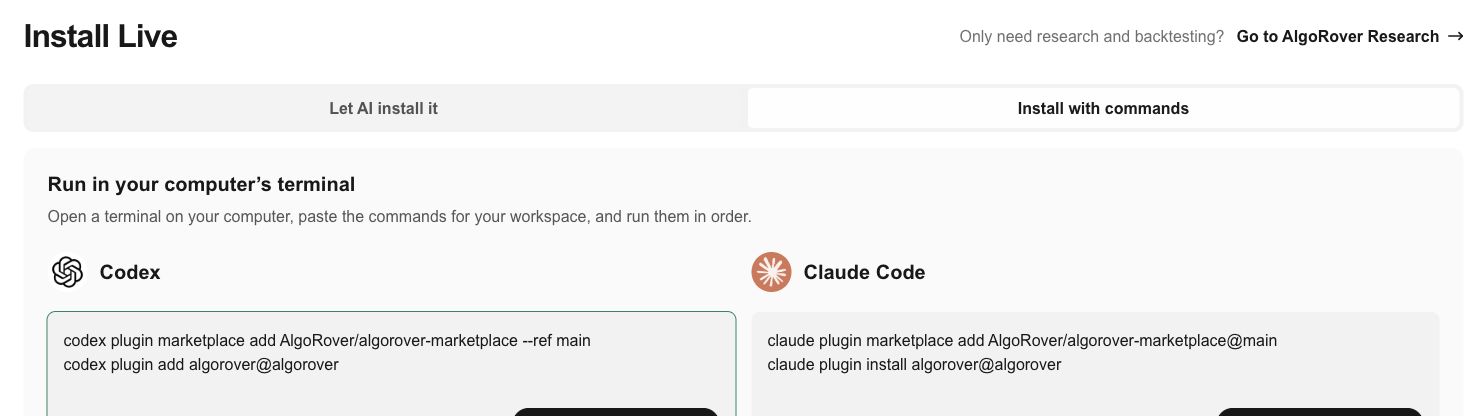
Before you begin
After installation, ask the AI to start using AlgoRover and follow its guidance to sign in through the Dashboard workspace. Demo deployment requires credentials for the matching exchange test environment; live deployment requires live-environment credentials. Configure credentials on the device running the strategy and confirm before starting live trading.
Choose your computer or your own VPS
Use your computer for short tests or when you can keep it powered on. Strategies execute on your computer, which must stay awake and online. They cannot keep running if it sleeps or shuts down.
Choose your own Linux VPS to keep strategies running after you close your laptop. AI helps check the server and deploy your strategy; active strategies execute on the server. You provide the VPS and pay the hosting provider’s fees. The server, network and exchange connection must remain available.
Follow the VPS guide to approve the deployment or migration plan and configure exchange API credentials again in the remote console. Existing credentials are not migrated with strategies. Review the strategy and run mode before approving the start.
Read the VPS deployment guideLooking for strategy research and backtesting?
See the separate Research guide for cloud and local installation, authorization, first backtests and report downloads.
Research cloud and local guide